
PromptDock
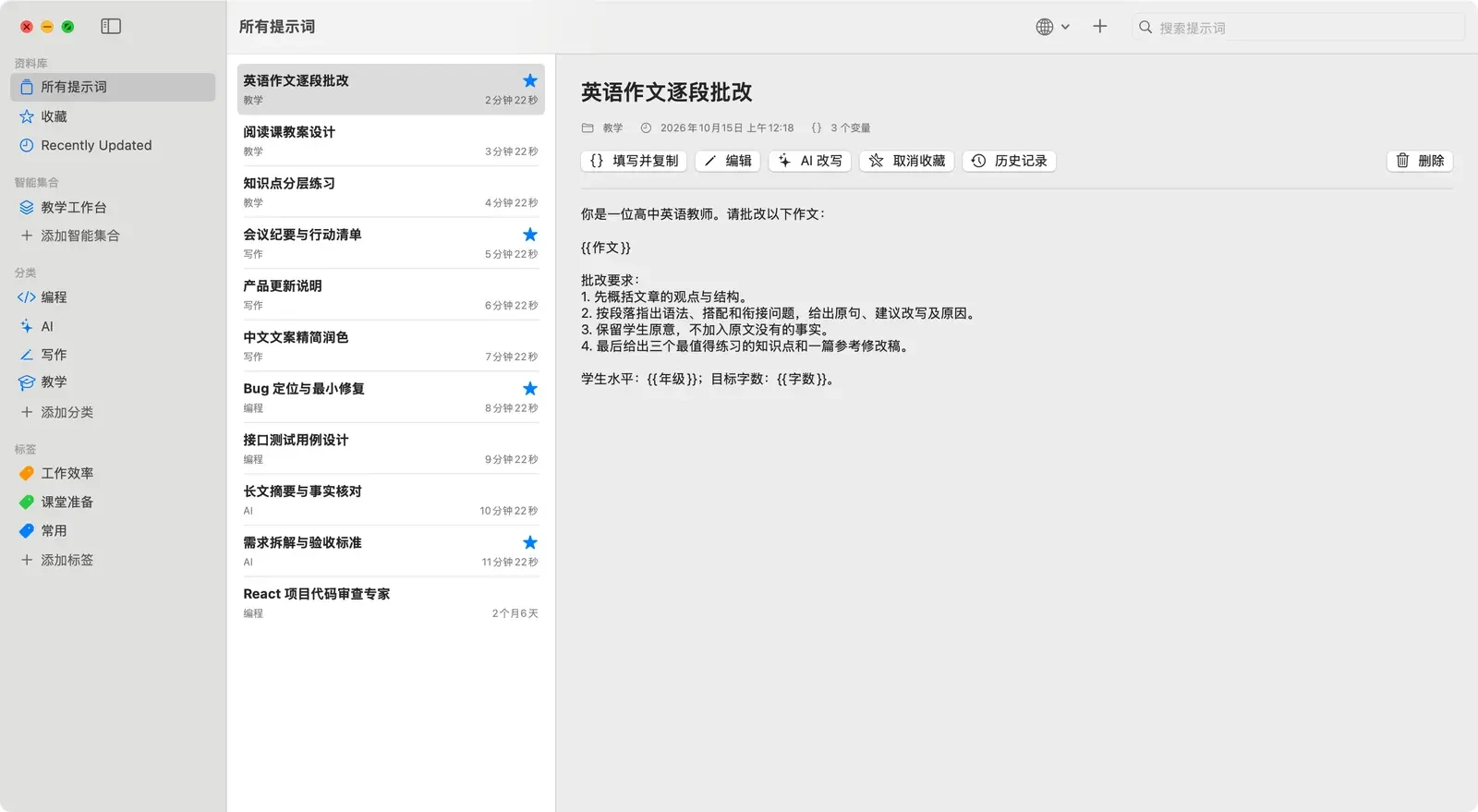
PromptDock 是一款原生 macOS 提示词管理工具,将常用 Prompt 整理成可搜索、可复用的个人资料库。支持分类与标签、模板变量、快捷搜索、版本历史和桌面 Widget,让提示词真正成为随时可调用的生产力工具。
SwiftUI · SwiftData · AppKit · WidgetKit · Keychain
本页目录
你的提示词,不该散落在聊天记录里
PromptDock 是一款为 macOS 设计的原生提示词管理工具。
它把经常使用的提示词整理成一个可搜索、可复用的个人资料库。平时安静地待在菜单栏,需要时通过快捷键快速唤出,找到合适的 Prompt 后即可直接复制使用。
核心功能
- 提示词管理:创建、编辑、收藏和排序常用 Prompt
- 分类与标签:通过分类、标签和智能集合整理不同工作流
- 快速搜索:搜索标题、正文和分类,并实时高亮关键词
- 全局快捷键:默认使用
⇧⌘P快速打开 PromptDock - 模板变量:支持
{{变量}}和{{列表[]}},将固定 Prompt 转换为可复用模板 - 版本历史:自动保存修改历史,可查看并恢复旧版本
- 桌面 Widget:快速复制最近使用或收藏的提示词
- 本地优先:提示词、分类、历史版本和图片默认保存在 Mac 本地
AI 模板助手
PromptDock 本身不依赖 AI 服务即可完整运行。
需要时,可以使用 AI 模板助手,将自然语言需求自动转换成带变量的 Prompt 模板。
目前支持:
- DeepSeek
- OpenAI 兼容接口
- 自定义 API Key
API Key 保存在 macOS Keychain 中,每次在线请求都需要用户主动确认。
技术实现
PromptDock 使用原生 Apple 技术栈开发:
- SwiftUI
- SwiftData
- AppKit
- WidgetKit
- macOS Keychain
无第三方运行时框架。
当前状态
PromptDock 目前处于 Early Access 阶段,支持 macOS 14 及以上版本。
Windows、iPhone 和 iPad 版本仍在规划中。
版本记录
PromptDock 1.2.0 (Build 7) — Early Access 预发布
PromptDock 1.2.0 (Build 7) — Early Access
PromptDock is a native macOS prompt library and local workflow tool designed for fast, private use.
PromptDock 是一款原生 macOS 提示词资料库与本地工作流工具,专注于快速、私密的使用体验。
What's new / 本次更新
-
Reorganized the sidebar around Library, Smart Collections, Categories, and Tags.
-
Added native multi-selection and batch organization for prompts.
-
Integrated categories, tags, and template-variable definitions directly into the editor.
-
Added repeatable variables, configurable labels and defaults, ordering, and live template filling.
-
Added AI Rewrite with before/after comparison and version-history preservation.
-
Improved Chinese and English localization and fixed mixed-variable, editor-selection, and asynchronous rewrite-state issues.
-
Fixed App Group authorization in distributed builds by using Xcode automatic signing, so existing local data opens normally.
-
侧栏按“资料库、智能集合、分类、标签”重新组织。
-
新增原生多选与批量整理。
-
将分类、标签和模板变量管理整合进编辑器。
-
支持可重复变量、显示名称、默认值、填写顺序和实时填写预览。
-
新增 AI 改写、原文对比及版本历史保留。
-
完善中英文翻译,并修复混合变量、首次编辑选择和异步改写状态问题。
-
改用 Xcode 自动签名,修复分发版本无法访问 App Group 资料库的问题,现有本地数据可正常打开。
Upgrade safety / 升级安全
Build 7 preserves the existing L96B6KHL5Y.PromptDock App Group. It has been opened against the existing data store successfully, so no data migration is required. Exporting a JSON backup before replacing an Early Access build is still recommended.
Build 7 保留现有的 L96B6KHL5Y.PromptDock App Group,并已使用现有资料库完成实际启动验证,因此不需要迁移数据。替换 Early Access 版本前仍建议先导出一份 JSON 备份。
Privacy / 隐私
Prompts, categories, tags, collections, history, backups, and imported category images stay on this Mac. API keys are stored in Keychain. PromptDock sends only the current prompt text and rewrite instruction to the selected AI provider after explicit confirmation.
提示词、分类、标签、智能集合、历史版本、备份和分类图片保存在本机,API Key 存入钥匙串。只有用户主动确认后,PromptDock 才会向所选 AI 服务发送当前提示词正文与改写要求。
Installation / 安装
-
Requires macOS 14 or later.
-
Quit PromptDock, open
PromptDock-1.2.0-build7.dmg, and drag PromptDock into Applications to replace the previous build. -
This Personal Team Early Access build is Apple Development signed but not notarized. If Gatekeeper blocks the first launch, Control-click PromptDock and choose Open.
-
需要 macOS 14 或更高版本。
-
退出 PromptDock,打开
PromptDock-1.2.0-build7.dmg,将 PromptDock 拖入“应用程序”并替换旧版本。 -
此 Personal Team Early Access 版本具有 Apple Development 签名,但未经公证。若首次启动被阻止,请按住 Control 点击 PromptDock 并选择“打开”。
Compatibility / 兼容性
- Apple Silicon and Intel Macs / Apple Silicon 与 Intel Mac
- macOS 14+ / macOS 14 及以上
- No automatic updater, account system, cloud sync, analytics, ads, or tracking / 暂无自动更新、账号、云同步、分析、广告或跟踪
Integrity / 完整性校验
The SHA-256 checksum is provided in PromptDock-1.2.0-build7.dmg.sha256.
SHA-256 校验值见 PromptDock-1.2.0-build7.dmg.sha256。
PromptDock 1.1.0 (Build 4) — Early Access 预发布
PromptDock is a native macOS prompt library and workflow tool designed for fast, private, local-first use.
PromptDock 是一款原生 macOS 提示词资料库与工作流工具,专注于快速、私密和本地优先的使用体验。
What's new / 本次更新
-
Fixed an issue where editing the initially selected prompt after launch could open an empty editor.
-
Added prompt version history with preview and restore.
-
Added tags and Smart Collections for organizing prompts across categories.
-
Added reusable template variables, repeatable list variables, live preview, and one-click copy.
-
Added optional AI-assisted template writing with DeepSeek and compatible custom endpoints.
-
Improved Chinese and English localization throughout the app.
-
Strengthened backup validation, startup recovery, URL validation, and local data safety.
-
修复应用启动后直接编辑首个高亮提示词时,编辑器可能显示为空的问题。
-
新增提示词版本历史,可预览并恢复旧版本。
-
新增标签与智能集合,可跨分类组织提示词。
-
新增普通变量、可重复列表变量、实时预览和一键复制。
-
新增可选的 AI 模板编写助手,支持 DeepSeek 与兼容的自定义接口。
-
完善应用内中英文翻译。
-
加强备份校验、启动恢复、URL 校验和本地数据安全。
Privacy / 隐私
Prompts, categories, backups, and imported category images stay on this Mac. API keys are stored in Keychain. PromptDock sends data to an AI provider only after you explicitly start an AI request; it sends the current template-writing request and syntax guide, not your saved prompt library.
提示词、分类、备份和导入的分类图片保存在本机,API Key 存入钥匙串。只有在用户主动发起 AI 请求时,PromptDock 才会向所选服务发送当前模板编写需求和语法手册,不会发送已保存的提示词库。
Installation / 安装
-
Requires macOS 14 or later.
-
Download
PromptDock-1.1.0-build4.dmg. -
Open the DMG and drag PromptDock into Applications.
-
This Early Access build is signed with a Personal Team certificate but is not notarized. If macOS blocks the first launch, Control-click PromptDock in Applications and choose Open.
-
To upgrade, quit PromptDock and replace the old copy in Applications. Existing data should remain available; exporting a JSON backup first is still recommended.
-
需要 macOS 14 或更高版本。
-
下载
PromptDock-1.1.0-build4.dmg。 -
打开 DMG,将 PromptDock 拖入“应用程序”。
-
此 Early Access 版本使用 Personal Team 证书签名,但未经 Apple 公证。若 macOS 阻止首次启动,请在“应用程序”中按住 Control 点击 PromptDock,然后选择“打开”。
-
升级时先退出 PromptDock,再替换“应用程序”中的旧版本。原有数据应继续保留,但仍建议先导出 JSON 备份。
Compatibility / 兼容性
- Apple Silicon and Intel Macs / 支持 Apple Silicon 与 Intel Mac
- macOS 14+ / macOS 14 及以上
- No automatic updater, account system, cloud sync, analytics, ads, or tracking / 暂无自动更新、账号、云同步、分析、广告或跟踪
Integrity / 完整性校验
The SHA-256 checksum is provided in PromptDock-1.1.0-build4.dmg.sha256.
SHA-256 校验值见 PromptDock-1.1.0-build4.dmg.sha256。